ros2-control介绍及使用
介绍
ros2_control 是一个使用 ROS2 控制机器人的框架,它将控制逻辑和硬件接口解耦,可以非常方便的替换控制逻辑或者硬件接口。
比如对于两轮差速小车,控制器可以使用两轮差速控制器,小车轮子的硬件接口可以随时切换为仿真小车或真实小车。
下面是官方的架构图:
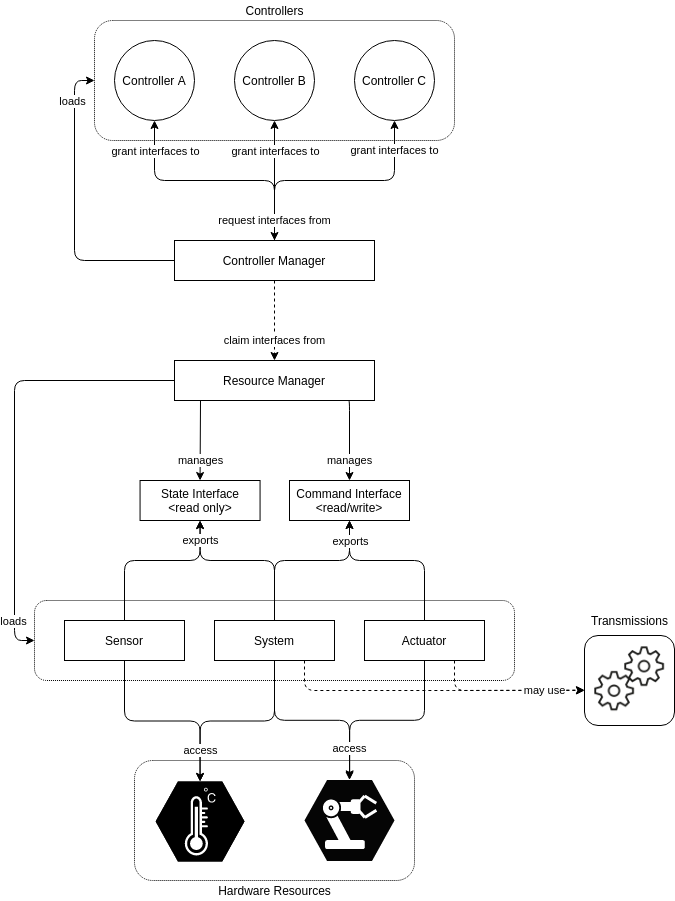
Controller: 实现的各个控制器
Controller Manager: 负责控制器生命周期管理,包括向资源管理器(Resource Manager)申请硬件接口
Resource Manager: 硬件接口管理
State Interface: 只能够读数据的状态类接口
Command Interface: 可读可写的命令类接口
Sensor: 传感器类型的接口实现,只会导出状态类接口
System: 多自由度硬件,如工业机器人
Actuator: 单自由度硬件,如阀门等
自定义硬件及控制器
实现一个 Echo 硬件,给它设置一个数值,他会将数值输出
硬件实现
自定义硬件需要继承对应的接口类并实现对应方法
| |
在 on_init 方法里解析 urdf 中声明的 hardware 参数
| |
read 方法读取硬件数据,这个函数会被周期性调用,这里直接读 echo_value 的值,实际硬件可能是读取串口数据
| |
write 方法将数据写入硬件,同样会被周期性调用,这里将值保存在 echo_value_ ,实际可能是写串口
| |
由于硬件实现是以插件的方式动态加载,还需要在最后注册以下
在 cmake 中将插件编译成动态库
find_package(ament_cmake REQUIRED)
find_package(robotics_cmake REQUIRED)
find_package(pluginlib REQUIRED)
find_package(hardware_interface REQUIRED)
find_package(rclcpp REQUIRED)
find_package(rclcpp_lifecycle REQUIRED)
add_library(echo_system_hardware SHARED
hardware/echo_system_hardware.cpp
)
ament_target_dependencies(echo_system_hardware
hardware_interface
pluginlib
rclcpp
rclcpp_lifecycle
)写一个 echo_system_hardware_plugin.xml 描述文件,内容如下:
<?xml version="1.0"?>
<!-- path: so 文件名称 -->
<library path="echo_system_hardware">
<!-- name: 插件名称 -->
<!-- type: 插件类的类型,robotics_codehub 是命名空间 -->
<!-- base_class_type: 插件基类类型 -->
<class
name="ros2_control_echo/EchoSystemHardware"
type="robotics_codehub::EchoSystemHardware"
base_class_type="hardware_interface::SystemInterface">
<description>My Echo System Hardware Interface</description>
</class>
</library>在项目根目录下的 CMakeLists.txt 中安装 xml 文件:
pluginlib_export_plugin_description_file(
hardware_interface
hardware/echo_system_hardware_plugin.xml
)实现控制器
定义控制器支持的参数的 yaml 文件,
echo_system_controller_parameters: echo_system_hardware_interface: { type: string, default_value: "", description: "Name of echo system hardware interface", read_only: true, }这里只定义一个
string类型参数,为EchoSystemHardware提供的接口名称在 CMakeLists 中生成 C++ 代码
find_package(generate_parameter_library REQUIRED) generate_parameter_library( echo_system_controller_params # 生成的库名 controller/echo_system_controller_params.yaml # 你的参数定义文件 )定义控制器类
1 2 3 4 5 6 7 8 9 10 11 12 13 14 15 16 17 18 19 20 21 22 23 24 25 26 27 28 29 30 31 32 33 34 35 36 37 38 39 40 41 42 43 44 45 46 47 48 49 50#pragma once #include <memory> #include <std_msgs/msg/float64.hpp> #include <controller_interface/controller_interface.hpp> #include <realtime_tools/realtime_thread_safe_box.hpp> #include <realtime_tools/realtime_publisher.hpp> #include "ros2_control_echo/echo_system_controller_params.hpp" namespace robotics_codehub { class EchoSystemController : public controller_interface::ControllerInterface { public: EchoSystemController(); // 命令类接口配置 controller_interface::InterfaceConfiguration command_interface_configuration() const override; // 状态类接口配置 controller_interface::InterfaceConfiguration state_interface_configuration() const override; // 节点生命周期 CallbackReturn on_init() override; CallbackReturn on_configure(const rclcpp_lifecycle::State& previous_state) override; CallbackReturn on_activate(const rclcpp_lifecycle::State& previous_state) override; CallbackReturn on_deactivate(const rclcpp_lifecycle::State& previous_state) override; // 控制管理器周期性调用 update controller_interface::return_type update(const rclcpp::Time& time, const rclcpp::Duration& period) override; private: std::shared_ptr<echo_system_controller_parameters::ParamListener> param_listener_; echo_system_controller_parameters::Params params_; rclcpp::Subscription<std_msgs::msg::Float64>::SharedPtr sub_; rclcpp::Publisher<std_msgs::msg::Float64>::SharedPtr pub_; realtime_tools::RealtimePublisher<std_msgs::msg::Float64>::SharedPtr realtime_pub_; realtime_tools::RealtimeThreadSafeBox<double> recv_; }; } // namespace robotics_codehub控制器实现之导出命令及接口
1 2 3 4 5 6 7 8 9 10 11 12 13 14 15 16 17 18 19 20controller_interface::InterfaceConfiguration EchoSystemController::command_interface_configuration() const { RCLCPP_INFO(get_node()->get_logger(), "command interface configuration"); controller_interface::InterfaceConfiguration conf; conf.type = controller_interface::interface_configuration_type::INDIVIDUAL; conf.names.push_back(params_.echo_system_hardware_interface); return conf; } controller_interface::InterfaceConfiguration EchoSystemController::state_interface_configuration() const { RCLCPP_INFO(get_node()->get_logger(), "state interface configuration"); controller_interface::InterfaceConfiguration conf; conf.type = controller_interface::interface_configuration_type::INDIVIDUAL; conf.names.push_back(params_.echo_system_hardware_interface); return conf; }即控制器要控制的命令接口,控制器启动时会由 Controller Manager 绑定对应接口
实现生命周期函数,在
on_init时获取参数1 2 3 4 5 6 7 8 9controller_interface::CallbackReturn EchoSystemController::on_init() { param_listener_ = std::make_shared<echo_system_controller_parameters::ParamListener>(get_node()); params_ = param_listener_->get_params(); RCLCPP_INFO(get_node()->get_logger(), "on init: %s", params_.echo_system_hardware_interface.data()); return CallbackReturn::SUCCESS; }在
on_configure时创建 ROS 话题1 2 3 4 5 6 7 8 9 10 11 12 13 14 15 16 17 18controller_interface::CallbackReturn EchoSystemController::on_configure( const rclcpp_lifecycle::State& previous_state) { (void)previous_state; RCLCPP_INFO(get_node()->get_logger(), "on configure echo sensor controller"); sub_ = get_node()->create_subscription<std_msgs::msg::Float64>( "~/set_echo_value", rclcpp::SystemDefaultsQoS(), [this](const std::shared_ptr<std_msgs::msg::Float64> msg) -> void { recv_.set(msg->data); }); pub_ = get_node()->create_publisher<std_msgs::msg::Float64>("~/echo_value", rclcpp::SystemDefaultsQoS()); realtime_pub_ = std::make_shared<realtime_tools::RealtimePublisher<std_msgs::msg::Float64>>(pub_); return CallbackReturn::SUCCESS; }set_echo_value会设置 echo 值,设置后保存在 recv_ 变量里,recv 是realtime_tools::RealtimeThreadSafeBox<double>类型,可以在 ros 回调线程和实时线程直接安全的转递值实现
update函数, update 函数会周期性在实时线程调用1 2 3 4 5 6 7 8 9 10 11 12 13 14 15 16 17 18 19 20 21 22 23 24 25 26controller_interface::return_type EchoSystemController::update(const rclcpp::Time& time, const rclcpp::Duration& period) { (void)time; (void)period; auto ref = recv_.try_get(); if (ref.has_value()) { double val = ref.value(); for (auto& cmd : command_interfaces_) { RCLCPP_INFO(get_node()->get_logger(), "update value: %f", val); (void)cmd.set_value(val); } } for (auto& state : state_interfaces_) { auto maybe = state.get_optional(0); if (maybe.has_value()) { std_msgs::msg::Float64 msg; msg.data = maybe.value(); RCLCPP_INFO(get_node()->get_logger(), "update state name: %s, value: %f", state.get_name().data(), msg.data); realtime_pub_->try_publish(msg); } } return controller_interface::return_type::OK; }update 分为两步:
从
recv_中获取值,然后设置值从
state_interfaces_中获取值并通过realtime_pub安全的发布
最后导出插件
编译成动态库
find_package(controller_interface REQUIRED) add_library(echo_system_controller SHARED controller/echo_system_controller.cpp ) ament_target_dependencies(echo_system_controller controller_interface pluginlib rclcpp rclcpp_lifecycle echo_system_controller_params # 自动生成的参数库 ) install( TARGETS echo_system_controller LIBRARY DESTINATION lib ARCHIVE DESTINATION lib RUNTIME DESTINATION bin )声明插件
<?xml version="1.0"?> <library path="echo_system_controller"> <class name="ros2_control_echo/EchoSystemController" type="robotics_codehub::EchoSystemController" base_class_type="controller_interface::ControllerInterface"> <description>My Echo System Hardware Controller</description> </class> </library>CMakeLists.txt 中安装
pluginlib_export_plugin_description_file( controller_interface controller/echo_system_controller_plugin.xml )
ros2_control 框架的使用
在 urdf 里面声明硬件接口
<?xml version="1.0"?> <robot name="my_sensor_robot"> <!-- ros2_control 硬件接口声明 --> <ros2_control name="EchoSystemHardware" type="system"> <hardware> <plugin>ros2_control_echo/EchoSystemHardware</plugin> <param name="echo_value">11.111</param> </hardware> <joint name="echo_system_hardware"> <command_interface name="echo_value"/> <state_interface name="echo_value"/> </joint> </ros2_control> <link name="base_link"/> <link name="system_link"/> <joint name="echo_system_hardware" type="continuous"> <parent link="base_link"/> <child link="system_link"/> </joint> </robot>发布 urdf
1ros2 run robot_state_publisher robot_state_publisher --ros-args -p robot_description:="$(cat install/ros2_control_echo/share/ros2_control_echo/urdf/echo_system_hardware.urdf)"写 controller 的配置文件,包括控制器配置
controller_manager: ros__parameters: update_rate: 1 echo_system_controller: ros__parameters: type: "ros2_control_echo/EchoSystemController" echo_system_hardware_interface: "echo_system_hardware/echo_value"启动 Controller Manager
1ros2 run controller_manager ros2_control_node --ros-args --params-file install/ros2_control_echo/share/ros2_control_echo/config/echo_sensor_ros_control.yaml启动成功后会加载 Echo Hardware ,并且周期性调用 read 和 write ,下面是启动后的日志
1 2 3 4 5 6 7 8 9 10 11 12 13 14 15 16 17 18 19 20 21 22 23 24 25 26 27 28[INFO] [1780908053.701387441] [controller_manager]: Using Steady (Monotonic) clock for triggering controller manager cycles. [INFO] [1780908053.704657475] [controller_manager]: Subscribing to '/robot_description' topic for robot description. [INFO] [1780908053.707790704] [controller_manager]: update rate is 1 Hz [INFO] [1780908053.707835626] [controller_manager]: Overruns handling is : enabled [INFO] [1780908053.707840170] [controller_manager]: Spawning controller_manager RT thread with scheduler priority: 50 [WARN] [1780908053.707904519] [controller_manager]: Could not enable FIFO RT scheduling policy: with error number <1>(Operation not permitted). See [https://control.ros.org/master/doc/ros2_control/controller_manager/doc/userdoc.html] for details on how to enable realtime scheduling. [INFO] [1780908053.891317702] [controller_manager]: Received robot description from topic. [INFO] [1780908053.891438034] [controller_manager]: Enforcing command limits is disabled. Command limits from URDF will be ignored. [INFO] [1780908053.893929516] [controller_manager]: Loading hardware 'EchoSystemHardware' [INFO] [1780908053.894856764] [controller_manager]: Loaded hardware 'EchoSystemHardware' from plugin 'ros2_control_echo/EchoSystemHardware' [INFO] [1780908053.894948711] [controller_manager]: Initialize hardware 'EchoSystemHardware' [INFO] [1780908053.916472060] [controller_manager.hardware_component.system.EchoSystemHardware]: Init EchoSystemHardware, echo value: 11.111000 [INFO] [1780908053.916593742] [controller_manager]: Successful initialization of hardware 'EchoSystemHardware' [INFO] [1780908053.916794337] [controller_manager]: Activating component 'EchoSystemHardware'. [INFO] [1780908053.916835732] [resource_manager]: 'configure' hardware 'EchoSystemHardware' [INFO] [1780908053.916854440] [resource_manager]: Successful 'configure' of hardware 'EchoSystemHardware' [INFO] [1780908053.916871576] [resource_manager]: 'activate' hardware 'EchoSystemHardware' [INFO] [1780908053.916896015] [resource_manager]: Successful 'activate' of hardware 'EchoSystemHardware' [INFO] [1780908053.917060798] [controller_manager]: Registering statistics for : EchoSystemHardware [INFO] [1780908053.917296139] [controller_manager]: Resource Manager has been successfully initialized. Starting Controller Manager services... [INFO] [1780908055.708362763] [controller_manager.hardware_component.system.EchoSystemHardware]: Read EchoSystemHardware, read value: 11.111000 [INFO] [1780908055.708689766] [controller_manager.hardware_component.system.EchoSystemHardware]: Write EchoSystemHardware, write value: nan [INFO] [1780908056.708382930] [controller_manager.hardware_component.system.EchoSystemHardware]: Read EchoSystemHardware, read value: nan [INFO] [1780908056.708499832] [controller_manager.hardware_component.system.EchoSystemHardware]: Write EchoSystemHardware, write value: nan [INFO] [1780908057.708349017] [controller_manager.hardware_component.system.EchoSystemHardware]: Read EchoSystemHardware, read value: nan [INFO] [1780908057.708548208] [controller_manager.hardware_component.system.EchoSystemHardware]: Write EchoSystemHardware, write value: nan [INFO] [1780908058.708411996] [controller_manager.hardware_component.system.EchoSystemHardware]: Read EchoSystemHardware, read value: nan [INFO] [1780908058.708649124] [controller_manager.hardware_component.system.EchoSystemHardware]: Write EchoSystemHardware, write value: na启动控制器
1ros2 run controller_manager spawner echo_system_controller --param-file install/ros2_control_echo/share/ros2_control_echo/config/echo_sensor_ros_control.yaml提示加载成功后,控制器使用的话题就能看到了
通过接口设置 echo 的值
1ros2 topic pub /echo_system_controller/set_echo_value std_msgs/msg/Float64 "{data: 1343242.34}"通过接口查看 echo 的值
1ros2 topic echo /echo_system_controller/echo_value
完整代码路径: https://github.com/xhcoding/robotics-codehub/ros2/ros2_control_echo